
Reviews help the Ludoya community find great games and know who they suit. What makes a review on Ludoya different: it shows how much its author really played the game, straight from their logged plays, so nobody has to take a score on faith.
Writing a Review
Reviews appear on the game's page, in social feeds and on your profile.
Rating a Game in One Tap
Open a game's reviews (tap its Ludoya score on its page). Above everyone's reviews, Played it? Rate it shows a row of numbers from 1 to 10: tap one. A word under it says what it means (8 is "Very good"), and a field appears for Your verdict in one line (optional): what you'd tell a friend, in up to 120 characters, like "The best two-player engine builder under an hour". Tap Post and that's a review.
Want a decimal, like 8.5? Tap the small ✎ at the end of the number row and type it.
You'll also be asked right after you play: under a finished play you were at, How was …? shows the same number row for a few days. One tap rates the game, or re-rates it if your opinion moved (it reminds you what you gave it before), and Add a verdict › (or Write a review › before you rate) opens the full review. Not now hides it for that game for the day, and it doesn't ask again when you rated the game in the last month.
The Full Review
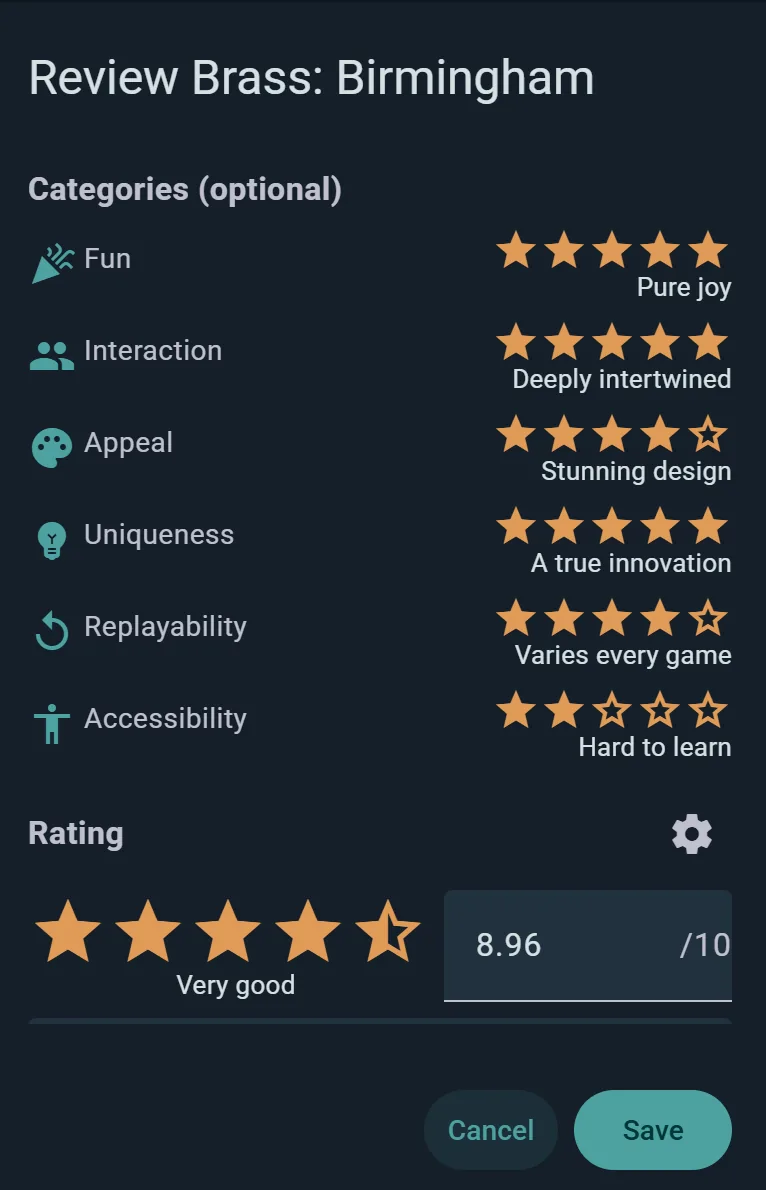
Write a full review › opens the whole form; Rate or review among the chips on a game's page opens it too. A rating with no words yet, such as one imported from BGG, opens the form from your rating chip, so you can add them. Your rating and verdict sit at the top, and everything else waits in tabs you only open if you want to:
- Review — as much as you want to say, plus a YouTube or TikTok video (or a video file), a link to your blog post, and photos. They lead your review, above the text.
- What it's like — where the game sits on five questions, the same ones as in Taste in games: Weight (light or heavy), Interaction (take-that or peaceful), Luck or skill, Abstract or thematic and Story or systems. Five circles each, from one end to the other; tap again to clear one. They describe the game, they don't score it: a heavy game isn't a better one.
- Player counts — Best, Good or Skip for each count, each with how often you played at it ("played ×3"); Other player counts opens the rest. Leave any count you don't know; tap a pick again to clear it.
- From a post — writing a post about a game you haven't reviewed, Write a review instead under the game opens this form with everything you wrote, your photos, video and link included, and nothing is posted. A post you already published about a game has Turn into a review in its ⋯ menu: once the review is saved the post is deleted, its photos and video moving to the review (its likes and comments can't follow, and you're told before).
- More — Anything readers should know?: tick what applies (you got the game for free to review it, you're paid for the review or it's sponsored, you work with the publisher or designer, you reviewed a prototype or preview copy). Your review says so in a line of its own wherever it appears, and it never changes how your review is ranked. Below it, tick whether your review gives away story or surprises (readers then open it themselves), and, for a game with expansions, which one you played it with.
Your Plays Speak for You
You don't type how much you played: Ludoya counts your logged, finished plays of the game and shows them with your review, for example 27 plays · mostly at 2 · since Apr 2024. Under three plays it reads First impressions, and with none logged it says No plays logged. Logging your plays, even after the fact, is what gives your review its weight with readers.
A review also sets your own rating of the game in your collection.
Tips for Writing Useful Reviews
- Lead with the verdict — one honest line beats three paragraphs nobody reaches.
- Say who it's for — the player-count calls and "What it's like" do most of it; add the rest in words ("great with families, too long for a weeknight").
- Be specific — instead of "I like it", explain why: "The negotiation phase keeps every player engaged."
- Highlight trade-offs — "Easy to teach but luck-heavy at five."
- Compare to similar games — "If you liked Splendor, you'll like the engine here; Azul has tighter rules."
- Mark spoilers — tick it under More for story-driven or legacy games, so readers choose to open it.
Saving Your Review
Tap Post (or Save in the full form). Your review appears on the game's page right away, pinned at the top as Your review, with Write a full review (or Edit full review) beside it; edit or delete it whenever you like from its ⋯ menu. Every review written on Ludoya can be liked and replied to; once it has a verdict line, text, a photo or a video it also reaches your followers' feeds. When you update one, it resurfaces in feeds marked as updated.
Sharing Your Review
A review's share menu has Image: a card of your review, with the game, your rating, your verdict and how many times you played it, square for a feed or as a 9:16 story, with a QR code that opens your review. A video review names its channel on the card, and what you disclose (a free review copy, a paid review…) is printed on it too, so the disclosure travels wherever the card goes. A review marked as having spoilers shares its verdict line only. The play count is the part no other review site can print.
Reading Reviews
Finding Reviews for a Game
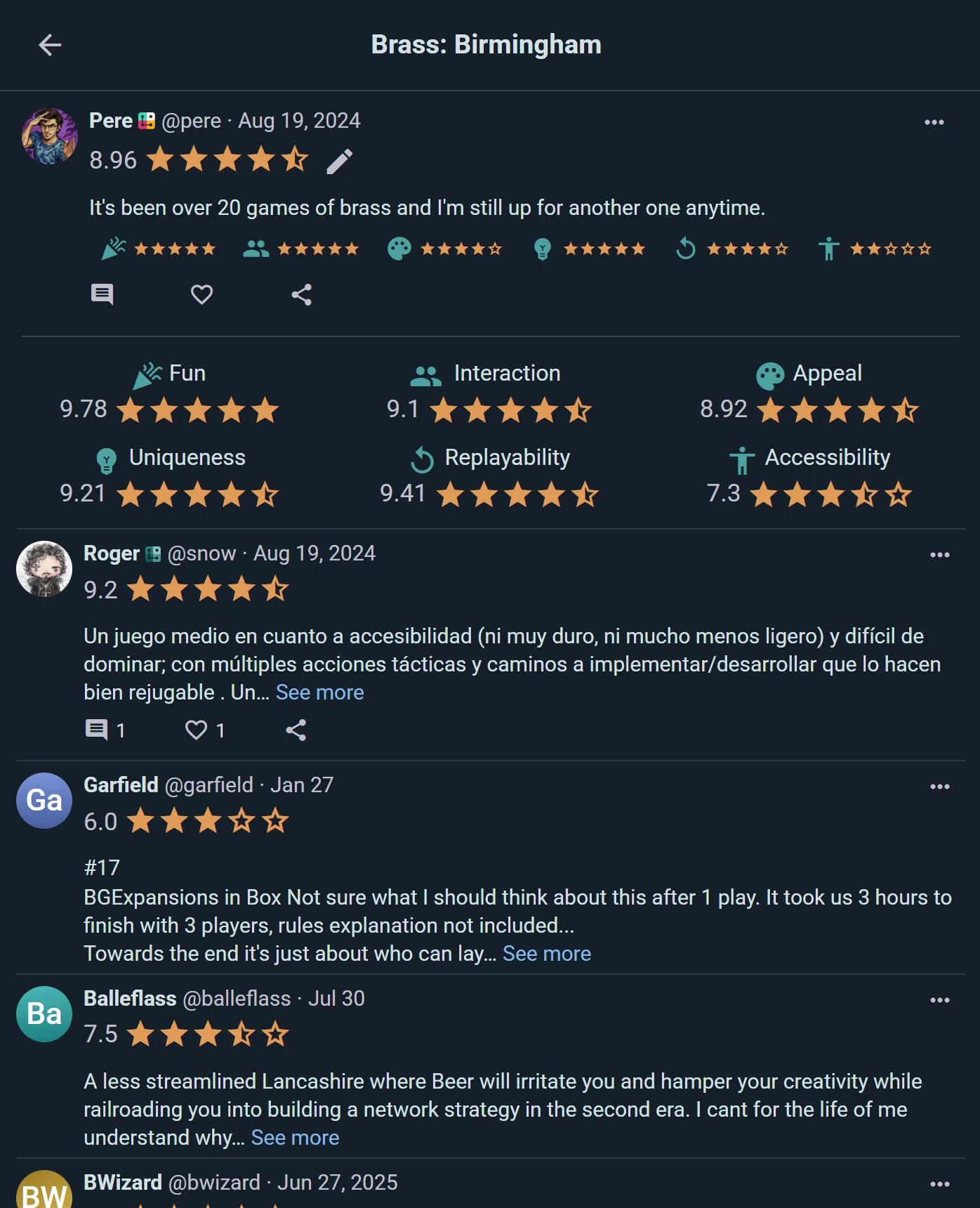
Open a game's page and tap its Ludoya score, or go to its Reviews. The top of the page sums them up, then lists every review.
The Summary

- The rating — the game's Ludoya rating, from how many reviews (the ⓘ beside it says how they're weighed), and a bar for each score from 1 to 10. A game loved by most and hated by a few shows it in the bars, where an average hides it. Fuller reviews count for more: a bare rating counts once, any comment twice, and a written review up to ten times once it reaches 500 words (a video review counts ten times too, and a review linked elsewhere, like a blog post, at least five). Filling in What it's like and the Player counts adds one more each. Nothing counts more than ten, however long.
- Weight — BGG's weight beside Ludoya's, on the same scale from 1 (light) to 5 (heavy). Ludoya's comes from reviewers who described the game's weight; it shows once three have, and until then it says how many so far.
- Player count — a bar for each count, split into the Best, Good and Skip calls reviewers made, with what most said, how many votes, how many of those voters logged a play at that count ("Best · 21 votes, 17 played at 2"), and how long the game usually takes at that count, from everyone's logged plays ("~45 min"). Every call counts; a bar is drawn fainter when fewer than half its voters played at that count, so you can tell logged experience from opinion.
- What it's like — the five questions of the full review, with a dot where reviewers put the game, once three described it (the number at the end of each line says how many did). If you've set your Taste in games, your own answer is a ring on the same line, so you can see at a glance whether the game is your kind of game; if you haven't, Set your taste to compare › takes you there.
Each Review
- Who wrote it and when, with their rating.
- Their verdict line, in bold.
- Their plays — how often they played, mostly at which player count, and since when (or First impressions, or No plays logged). Plays show only for reviewers whose profile and plays are public.
- Their calls per player count — "Best at 2", "Skip at 5"; marked "not played" when they never logged a play at that count — and With … when they played it with an expansion.
- What they disclose, on its own line: a free review copy, a paid review, working with the publisher or designer, a preview copy.
- Then their video, link or photos, and the text. A review that gives away story or surprises is folded behind Contains spoilers · Show. A review in another language can be translated in place.
Sorting and Filtering
Reviews come Relevant first: newer ones rise, fuller ones rise (the same weight as in the rating), and so do the ones people liked. The sort button also offers Newest, Most played, Highest rated and Lowest rated. Ratings imported from BoardGameGeek come last, folded under N ratings imported from BoardGameGeek: many are collection notes rather than reviews. The chips narrow the list:
- Your clubs first — people from your clubs at the top.
- Played 3+ times — past first impressions.
- Player count — only reviewers who logged a play at that count.
- With video and Your languages (the languages you read).
A Reviewer's Reviews
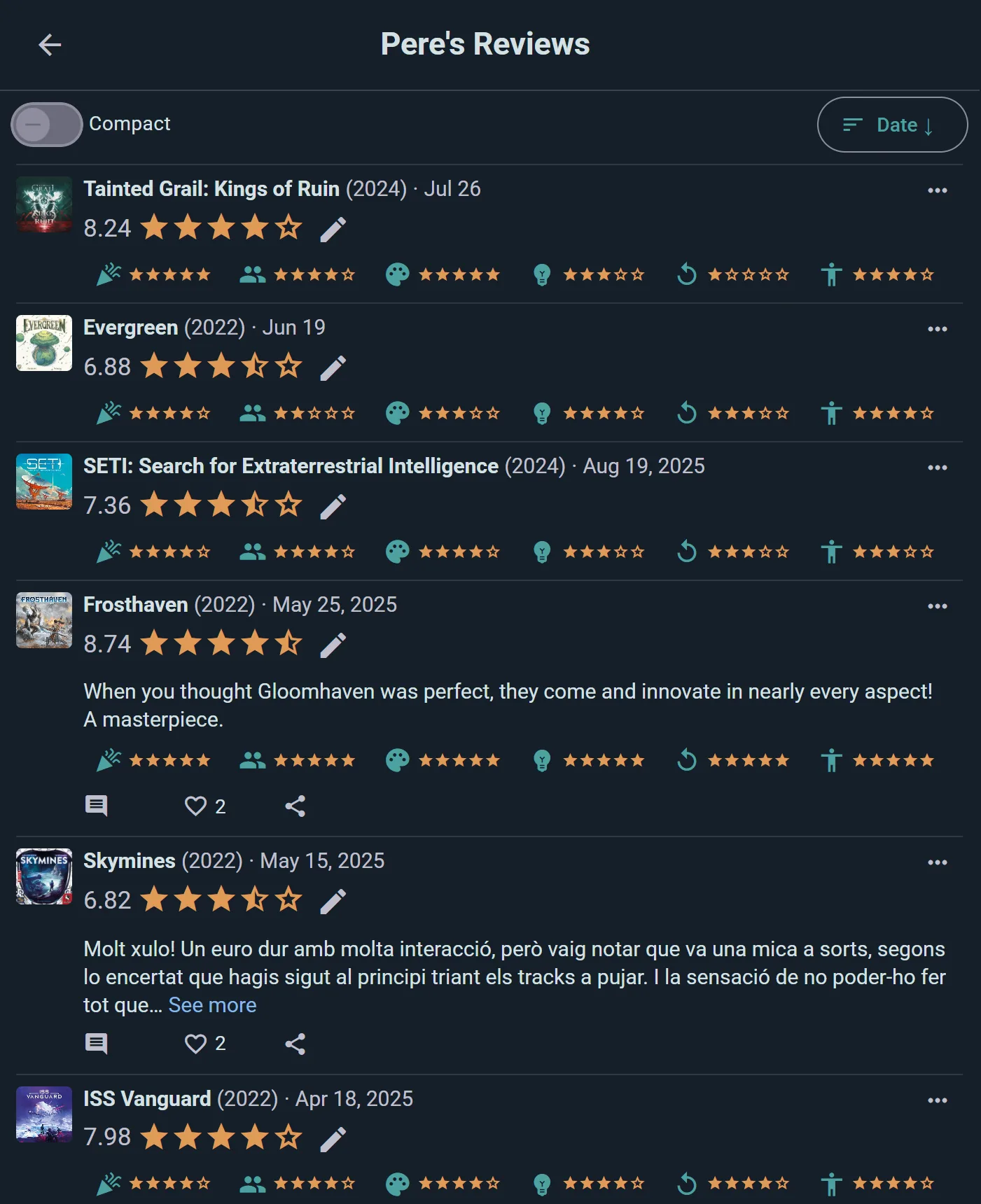
Everyone's reviews are listed on their profile, under Reviews: their name, how many reviews, Follow and their channels on top, then their reviews, sortable by date, relevance or rating, with All, Videos and Disclosed (review copies, paid reviews and the like) chips: the page to follow a reviewer or a creator from.
Keeping It Civil
Every review has a ⋯ menu with Report and Block for reviews that cross a line. See Privacy & Visibility.
For Publishers
A publisher's account (with the Club plan) has Reviews in its console, under Insights, once the account is linked to the company in the catalogue: open your company's page from the credits of any of your games and choose This is my company; it shows once Ludoya approves it. It reads the reviews of every game that lists you as publisher, and of your editions. Pick one game in Game, at the top, and everything below is about that game alone:
- The numbers: how many reviews (and how many this month), their Ludoya rating, the share of reviewers who played three times or more, and how many disclose a review copy, a paid review or an affiliation.
- Review copies: the copies you sent out for review, and how many have been covered. Choose Add a copy, then pick who got it (their Ludoya account, or the name of someone who isn't on Ludoya), the game, the day you sent it and, once they've posted it, the link to their review; Add another keeps the game and the date for the next copy of a batch. A copy sent to an account shows as reviewed on Ludoya, with its rating, once that person reviews the game after you sent it; for the others, add the link to their video or article (which marks it covered) or mark it covered yourself. Copies still waiting come first and say for how long, in amber after a month; edit or remove a copy from its row, and download the list with the review links.
- Coverage: the video and linked reviews, and those that disclose how the reviewer came to the game, newest first, with the reviewer, their channel, the game, the rating, and how many times they played it (when their profile and plays are public). Open the video or the article from its row, or download the table as a CSV, which carries their addresses.
- What reviewers say: what reviewers praise and complain about, each with a short quote (translated into your language when its review is written in another) and about how many of the reviews read mention it. Open a quote to read its whole review. The AI reads up to the newest 150 written reviews, in your language, and refreshes it every week.
- Reviews per month and Rating per month over the last year. The current month is still filling up, and a month shows its rating once it has three reviews.
- Played both: your most reviewed game, or the one you picked, next to the games its reviewers also rated, with what the people who rated both gave each. Your own games among them are marked.
Reviews in Social Feeds
Publishing & Updates
When you publish a new review or update an existing one:
- It appears in your followers' feeds, with your plays and your player-count calls
- Friends see your rating, your verdict line and a preview of your text
- They can open it to read the full review: the whole text, where the reviewer puts the game on the What it's like questions they answered (beside your own taste as a ring, if you've set it), and All reviews of … to see what everyone else thinks
- They can like or reply to it directly in their feed
Discovery Through Reviews
Browse your social feed to discover new perspectives on games:
- See what games your friends are reviewing
- Find new games mentioned in reviews from people you follow
- Engage with reviews by liking and commenting
Replying to Reviews
- Click a review to expand it fully
- You can like the review or write a reply
- Replies appear threaded under the original review
- Build conversations around games you're interested in
Reviews on the Game Page
A game's page shows your own rating (or Rate or review) and the Ludoya score among the chips under its name. Tap the score for the game's reviews.
Why Reviews Matter
- Help you decide if a game fits your group, at the player count you actually play
- Show how much each reviewer knows the game before you trust their score
- Highlight both strengths and potential weaknesses
Tips for Great Reviews
- Be honest — Share your genuine experience, not what you think people want to hear
- Log your plays — they appear with your review and are the best proof you know the game
- Be concise — A good verdict line and a few well-chosen sentences beat a wall of text
- Say how you came to the game — a free copy, a paid review, a preview: tick it, and it never counts against you
- Respect differences — Different players enjoy different things; your experience isn't the only valid one
- Update reviews — If your opinion changes after more plays, update your review so it stays accurate