
Play matching is how an event gets people to its tables. Pick one when you create or edit an event: tap + Play matching and choose from the list.
- Ludoya plans the tables — for club evenings and open play. People say when they're here and which games they want to play; Ludoya proposes who plays what, when and at which table
- People book a timetable — for a play stand, like a publisher's demo tables at a fair. Every table runs sessions at set times, and visitors book a seat
- Ludoya matches playtesters — for prototype days. Designers bring their prototypes, and Ludoya matches everyone into tables, slot by slot
Visiting a stand? Jump to Booking a session.
Each choice in the list says what it is for, and the plan it comes with when yours doesn't have it. An event runs one of them at a time, or none. Ludoya plans the tables comes with the Club plan; People book a timetable and Ludoya matches playtesters come with Business. An event that already has one keeps it.
Each of them seats the people who sign up on Ludoya, so an event with a play matching always takes its sign-ups here: the attendance mode is not a choice. If you turn one on for an existing event that signed up elsewhere, the editor says its sign-ups move to Ludoya before you save.
Ludoya Plans the Tables (Club Tier)
Built for club evenings and open-play corners, where people come and go and nobody wants to plan a lineup by hand.
As an attendee
- Attend the event and say which hours you're there
- Rate the games on its list: Need to play, Interested, Maybe or Pass
- Ludoya proposes tables. They show in the event's schedule with a Proposed chip, and the ones that include you offer Count me in or Skip this game
- My tables narrows the schedule to your own, with who you sit with, and the bar on top says what's next: "Your next: Cascadia · 6:00 PM · 3 more tables"
A table is set once everyone at it counts in, or a while before it starts (the organizer picks how long). You're never seated at a game you passed on, never at two tables at once, and the plan spreads the seats so everybody plays something.
As the organizer
- In the event's settings: how many tables at once the room holds, when proposals are confirmed, and the setup time between games
- The console's overview has the plan at a glance under Run it: how many people, how many tables are confirmed or proposed, and the most tables out at once
- The console's Programme lists proposals as ordinary rows. Set now confirms one, Set all confirms them all
- Needs attention on the console's overview names who has no seat at a game they need to play, and when another copy of a game would seat them
- Attendees shows each person's tables, free time and the games they have no seat at, and Remind to rate nudges the people who still have games to rate
- On the games page you can change how long a game takes here, or Plan one anyway
People Book a Timetable (Business Tier)
Built for a play stand that demos games all day: a publisher at a fair, a store's demo corner. Every table runs one game in sessions at set times, and visitors book a seat from their phone.
Setting up the stand
Pick People book a timetable in the stand's settings, then set its rules:
- Sessions per person per day — how many sessions one person can book each day
- Booking opens — when each day's sessions open for booking, or as soon as they're published
- Hold a booked seat for — how long after the start a booked seat waits for its owner to check in
- Walk-up seats — seats in every session that can't be booked ahead, for people who come to the stand
- Where at the fair — the hall and booth, shown on every session
- Ask for feedback — your own questions, asked of everyone who played once their session is over
Then build the timetable from the stand's page in the console, with Build the timetable (later, Add sessions). Add the tables (the game, the seats and the language of each), drag along each day to draw the stand's hours (drag a stretch's ends to change them, tap it and its × to clear it), and set how long a session lasts and the break between them. A gap you leave in a day is a pause; a day you draw shorter has its own hours; a day you leave empty gets no sessions. The builder counts what it will add before you confirm, and never makes the same table at the same time twice.
Booking a session
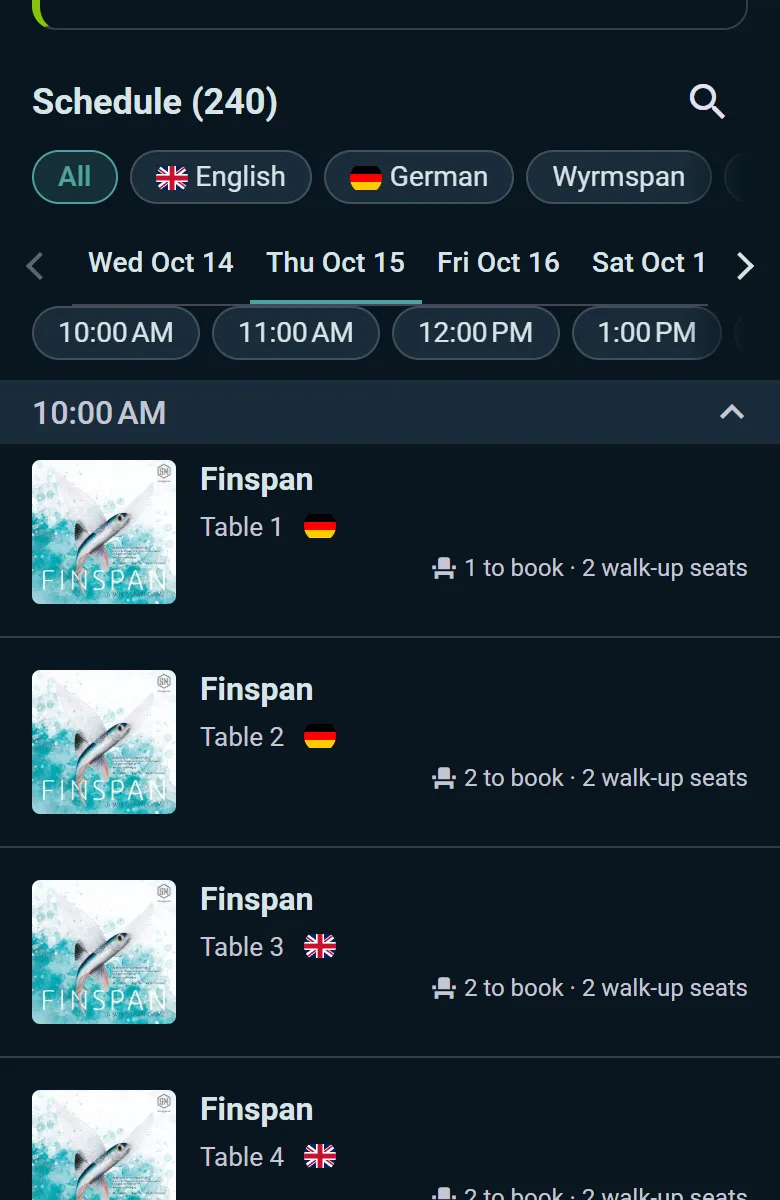
A stand's schedule lists its sessions hour by hour, with what is left: "2 to book · 2 walk-up seats", "Booked up · 1 walk-up seat", or "3 free until 11:19 AM" on a session that has started. Its games page says where the next free seat is.
- Book today's session (or tomorrow's, or Book your Fri session) books a seat. One booked session a day is the usual rule, and the stand's page says how many. My tables in the stand's schedule lists the ones you booked
- A booked session shows My check-in code: show it at the stand within the hold time after the start, or your seat goes to the wait list
- A session booked up ahead offers Join wait list, with how many are ahead of you. At the start, the wait list gets the walk-up seats first, and whoever moves up is told: check in at the stand within the hold time, as with any booked seat
- Once a session has started, its free seats are taken by walking up to the stand: the desk seats you there during the session's first minutes (15 for a 45-minute session). A walk-up seat doesn't use up your booking for the day
- After playing, the stand's questions appear on the session's page, and your answers are not shown to the stand with your name
Running the desk
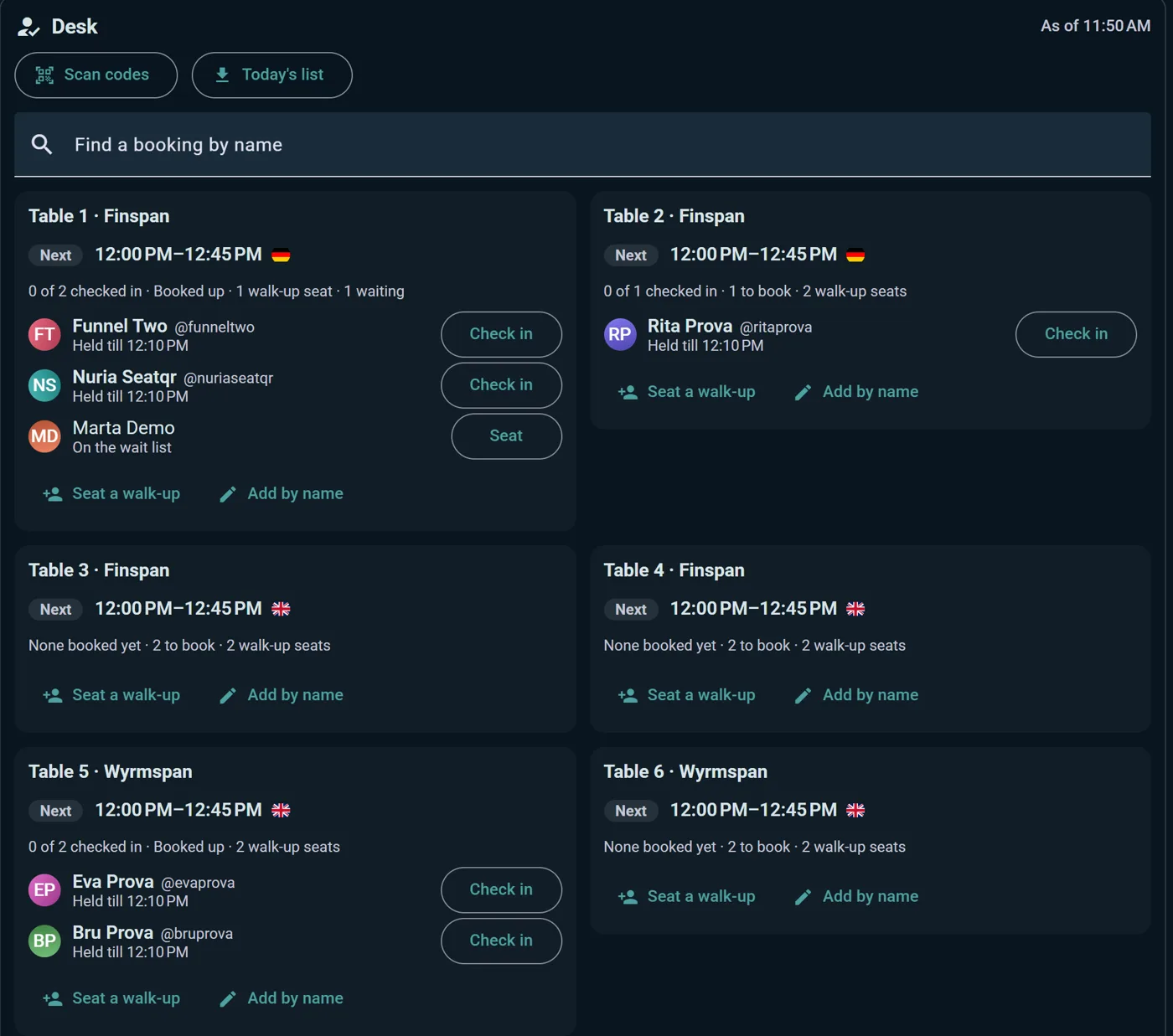
The stand's page in the console is the Desk your staff work from:
- Every table with the session on Now and the Next one, and who has checked in
- Check in for each booked person, Seat for someone on the wait list, and Seat a walk-up (or Add by name) for whoever is standing at the table. Undo check-in and Remove walk-up put a mistake right
- When a booked seat isn't claimed in time it goes to the wait list on its own; Give to wait list now hands it on early
- The tables that need someone are listed at the top, with Needs you on their card
- Find a booking by name looks someone up on any day; if they have nothing, it offers the tables with a free seat. Scan codes checks people in from their code, and Today's list downloads the day on paper for when the Wi-Fi goes
- Below the desk: the timetable's numbers, the wait lists, the stand's rules, and what players answered to your questions, game by game
Ludoya Matches Playtesters (Business Tier)
Built for prototype nights and design meetups. Designers bring their prototypes to the event, players attend, and Ludoya matches everyone into tables, slot by slot, so every prototype gets played and every player gets a seat.
Pick Ludoya matches playtesters in the event's settings, then run it from the event's console, under Playtesting: set the slot length and how many tables there are, and Generate schedule once the designers have brought their prototypes. When attendance or the prototypes change, Update schedule fits the new picture into the tables that aren't playing yet.
Players rate the prototypes they'd like to try on the event's page, with the same four answers as any game (Need to play, Interested, Maybe, Pass), and Ludoya seats them at those first. Their tables show in the event's schedule under My tables.