
Etkinlikleri büyük ölçekte yürüten organizatörler için profesyonel araçlar — kapıda QR ile giriş doğrulama, etkileşimli salon planları, özel kayıt formları, katılımcı verisi dışa aktarımı ve uygunluk analizi. Özel kayıt formları (beş soruya kadar; Club ile sınırsız) ve katılımcı verisi dışa aktarımı her planda ücretsizdir; geri kalanı Club ve Business premium planlarında bulunur.
QR ile giriş doğrulama (Business planı)
Bir QR kodu tarayarak insanların kapıda girişini yap. Ludoya listede olduklarını doğrular ve Giriş yap seçeneğine tek dokunuş, geldiklerini işaretler — refakatçilerini de —; böylece insanlar geldikçe katılım kaydın kendiliğinden oluşur. Kâğıt liste yok, sonradan karşılaştırma yok.
Aynı kodu yeniden okutmanın zararı yok: uygulama kişiyi iki kez saymak yerine "Zaten içeri alındı" der.
Kapılar açılmadan önce ayarlanacak iki şey:
- Etkinlik için QR katılımını aç. Varsayılan olarak kapalıdır — etkinliğin ayarlarından Katılımı QR kodu ile doğrula seçeneğini etkinleştir. Bu seçenek yalnızca bir grup tarafından düzenlenen etkinliklerde vardır, kişisel olanlarda yoktur.
- Kameralı her cihaz kapıda iş görür: Ludoya uygulaması veya tarayıcıdaki web sitesi; telefonda, tablette veya dizüstü bilgisayarda. Katılımcıların da uygulamaya ihtiyacı yoktur — QR kodları tarayıcıda gayet iyi görünür.
Giriş kaydı bir kapıya aittir. Bir festival için açmak onun aktivitelerine de ulaşır, ama planlanmış bir oyun hiçbir zaman kendi başına giriş yapmaz, bir konuğun etkinliğine eklediği hiçbir şey de yapmaz: bir masaya oturan herkes etkinliğin listesinde de vardır, bu yüzden etkinliğin kendi kodu onları içeri alır.
Gelmeyen biri sonradan katılımcı listesinden Katılmadı olarak işaretle ile yine de işaretlenebilir.
Nasıl çalışır
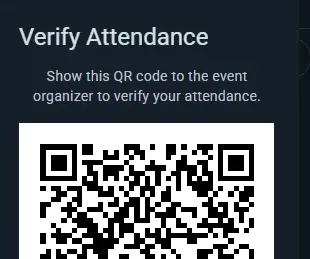
- Katılımcılar etkinlik sayfasını uygulamada veya web sitesinde açar ve katılım düğmesine dokunur
- Katılım düğmesi bir açılır menü gösterir: katılımını değiştirme, etkinlikten ayrılma, kendi katılım programını düzenleme ve istendiğinde QR kodunu gösterme
- Benzersiz QR kodu kaydolduklarında onlara e-postayla gönderilir (e-posta veren her isimli konuğa da) ve her zaman QR kodunu göster altında durur — yazdırılacak bir şey yok
- Kapıda kodu tara — Ludoya onu katılım listesiyle karşılaştırır ve kişinin girip giremeyeceğini gösterir; Giriş yap kişiyi kaydeder
QR kodları
- Her katılımcının kodu o etkinliğe özeldir; e-postasında ve etkinlik sayfasındaki katılım düğmesinin açılır menüsünde bulunur
- Bir telefonun kamerasını ona tutmak, katılımcının Ludoya'daki kendi giriş sayfasını açar; kapıda onu Ludoya'nın okuyucusuyla tara
- Okutma anlıktır
Faydaları
- Altlık ya da kâğıt listeler olmadan hızlı, sürtünmesiz kapı kontrolleri
- Anında katılım doğrulaması — bu kişi girebilir mi, giremez mi?
- Yazdırılacak bir şey yok: kaybolan bir e-posta sorun değil, kod etkinlik sayfasında da var
- Katılım bildirmemiş kişilerin içeri sızmasını engeller
Adlandırılmış Alanlar (Organizasyonlar)
Mekânınızın içinde adlandırılmış alanlar tanımlayın ve etkinlikleri ile planlanmış oyun oturumlarını bunlara atayın.
Konumlar ve alanlar
Konumlar (mekânınız ya da kuruluşun kullandığı herhangi bir fiziksel yer), içlerindeki gerçek bölgelere karşılık gelen adlandırılmış alanlar içerebilir:
- Bir kafenin her masası için bir alanı olabilir ("Masa 1", "Masa 2", "Pencere kenarı")
- Bir fuar salonu odalara ayrılabilir ("Ana Salon", "RPG Odası", "Tanıtım Alanı")
- Çok katlı bir mekân alanları kata göre adlandırabilir ("Üst kat — Masa A", "Alt kat — Arka Oda")
Alanları kurma
- Konumu açın: kulübün konsolundan Konumlar (veya kendi konumlarınız için Ayarlar → Konumlar)
- O konum için alanları oluşturup adlandırın (ör. "Masa 1", "Arka Oda", "Ana Salon")
Alanları etkinliklerde kullanma
O konumdaki her etkinlik alan talep edebilir — üstelik yalnızca birini değil, aynı anda birkaçını. Arka odayı ve öndeki iki masayı devralan bir kulüp gecesi üçünü birden seçer.
Genelde şöyle işler:
- Mekânın tamamını kaplayan bir etkinlik (bir fuar, mekânı baştan sona alan bir kulüp gecesi) çoğu zaman alanları hiç kullanmaz ve sadece konumda durur. Bu gayet normaldir — alanlar isteğe bağlıdır.
- Alt etkinlikler, kendi kollarının kapsadığı odaları ya da bölgeleri seçer; böylece katılımcılar nereye gideceklerini bilir: "Başlangıç kolu → Ana Salon", "İleri kol → Arka Oda".
- Planlanmış oyun oturumları, oynandıkları masayı seçer.
Bilinmeye değer bir kural: bir ana etkinlik alan talep ettiğinde, alt etkinlikleri artık alan seçiciyi sunmaz — ana etkinliğin seçimi her şeyin nerede olduğunu zaten anlatır. Her alt etkinliğin ve masanın kendini iğnelemesini istiyorsanız ana etkinliği alansız bırakın.
Katılımcılar böylece kollarının ya da masalarının tam olarak nerede olduğunu görür ve aynı anda süren iki şey aynı masayı talep edemez.
Masa başına bir oyun oturumu
Masa olarak işaretlenmiş bir alanda aynı anda tek bir oyun oturumu oynanır. Bir oyun oturumu için masa seçtiğinizde seçici, o saatte başka bir oyun oturumunun tuttuğu her masayı işaretler ("dolu 20:00–22:00") ve dolu bir masa kaydedilemez. Arka arkaya oyun oturumları sorun değildir; bir salon birkaç oyun oturumunu yan yana ağırlar ve hiçbir zaman denetlenmez; masayı ayırmış bir etkinliğin içindeki oyun oturumu ise masayı o etkinlikle paylaşır.
Mekanındaki her oyun oturumunun nerede oynandığını belirtmesini isteyen bir kulüp, konumun Salonlar ve masalar bölümünde Buradaki oyun oturumları masa seçer seçeneğini açar (kulüp konsolu → Konumlar). Bundan sonra orada yeni bir oyun oturumu masa olmadan kaydedilemez; önceden planlanmış oyun oturumları olduğu gibi kalır.
Etkileşimli kat planları (Business planı)
Adlandırılmış oyun alanlarınızın üstüne görsel bir harita katmanı ekleyin. Bir kat planı görseli yükleyin ve her oyun alanını üzerine yerleştirin — katılımcılar mekanınızı her masanın, odanın veya oyun bölgesinin işaretli olduğu, kaydırılıp yakınlaştırılabilen bir haritada keşfeder.
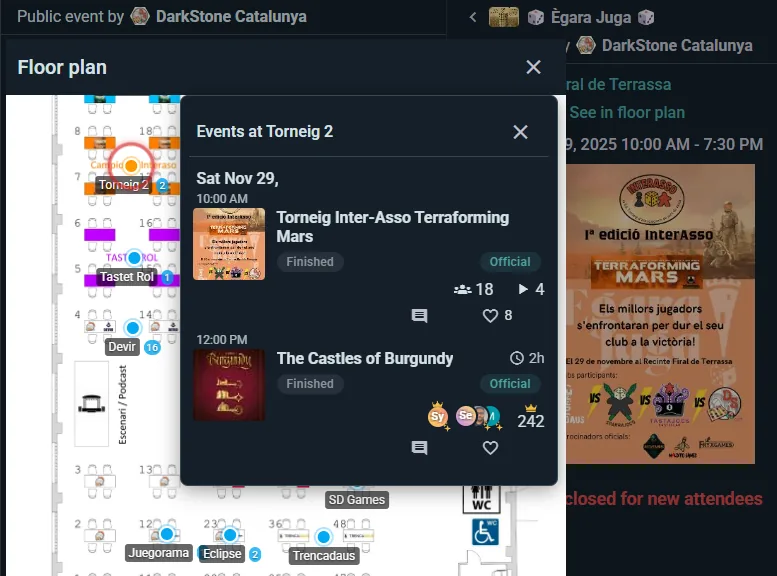
Kat planı kurma
- Zaten oyun alanları olan bir konumu açın (konsolda Konumlar) ve kat planını açın
- Bir kat planı görseli yükleyin (fotoğraf, eskiz veya mimari çizim)
- Bir oyun alanını görselin doğru bölümüne sürüklemek için ona tıklayın
Kat planı olmadan oyun alanları yine düz metin etiketleri olarak çalışır (“Masa 3'te oturuyorsunuz”). Görsel kat planı, yol bulmanın önemli olduğu büyük mekanlarda en çok işe yarar.
Bir kasaba, bir meydan ya da bir park: gerçek bir harita
Bir kasabaya yayılmış bir festival, tek bir meydanda çadırlardan oluşan bir fuar, bir parkın içinden geçen bir rota: çizilecek bir plan yoktur. Bunların yerleri bunun yerine gerçek bir haritaya (Google Maps) konur ve bulundukları noktada işaretlenir.
- Konsolda Konumlar bölümünde mekânı açın. Önerilerden seçilen bir kasaba (ya da Google'ın park veya meydan olarak tanıdığı bir yer) kendiliğinden haritalı bir mekândır; başka her şey için (bir fuar alanı, Google'ın sokak saydığı bir meydan) Gerçek bir haritada göster seçeneğini açın. Haritanın yeri bilmesi için adres önerilerden gelmelidir. Bunun yerine görsel kullan kat planı görseline geri döner.
- Yerleri haritada işaretle haritayı açar. Haritada olmayanlar arasında listelenen bir yere, sonra bulunduğu noktaya dokunun; ya da oraya yeni bir yer eklemek için haritanın boş bir kısmına dokunun (Geri al, aslında haritayı kaydırmak için yapılmış bir dokunuşu geri alır). Bir işareti taşımak için sürükleyin; Haritadan kaldır işareti kaldırır.
- Bir yerin yine kendi planı olabilir (masalarıyla bir salon): görselini yerin ayrıntılarına ekleyin; masaları her zamanki gibi o görselin üzerine çizilir. Ziyaretçiler ona İçini gör ile ulaşır.
Katılımcılar gerçek haritayı etkinliğin mekân haritasında görür: her yerin adı işaretinin üzerinde, orada kaç etkinlik olduğuyla birlikte (gösterilen saatte hiçbir şey olmayan yerler soluk görünür); bir yeri adıyla bulmak için Yer listesi, bir çadırı yanındakinden ayırt etmek için Uydu görünümü ve telefonun konumunu yalnızca dokunulduğunda isteyen Konumumu göster. Bir yere dokunmak haritayı korur ve yerin kartını gösterir: orada ne olduğu, oraya varınca nasıl bulunacağı, kendi planı olan bir salon için İçini gör ve Yol tarifi. İşaretli bir yerdeki etkinlik de Yol tarifi gösterir ve etkinlik sayfası haritanın küçük bir resmini gösterir. Sonradan yüklenen bir kat planı görseli haritanın yerini alır; haritada işaretli yerler, görselde onlar için bir şekil çizilene kadar işaretlerini korur.
Etkinlik günü mekan haritası
Kat planı olan bir mekandaki etkinliğin kendi mekan haritası görünümü vardır. Her masa ve oda orada ne olduğunu gösterir: birine dokunun, aktiviteleri saatleri, yerleri ve katılma yoluyla birlikte bir çekmecede açılır. Masa adları telefonda masalarına sığmak için küçülür; böylece harita bir kol mesafesinden okunabilir kalır.
Bir konumun ve oyun alanlarının her birinin kendi kısa metni olabilir: hangi kapı, oda ne için, “anahtarı bardan isteyin”. Oyun alanları açık API üzerinden de dışarı verilir; böylece kendi web siteniz onları gösterebilir.
En uygun olduğu yerler
- Birden fazla odası veya bölgesi olan büyük mekanlar
- Düzinelerce masalı konvansiyonlar
- Müdavimlerin en sevdikleri yeri seçmek istediği oyun kafeleri
- “Oyunum nerede?” sorusunun sık sorulduğu her mekan
Özel katılım formları (her planda ücretsiz — beş soruya kadar, Club ile sınırsız)
Katılımcılara katılım bildirirken sorular sorun — daha iyi bir etkinlik yürütmek için ihtiyacınız olan bilgiyi, dış bir form aracı için Ludoya'dan çıkmadan toplayın.
Özel sorular oluşturma
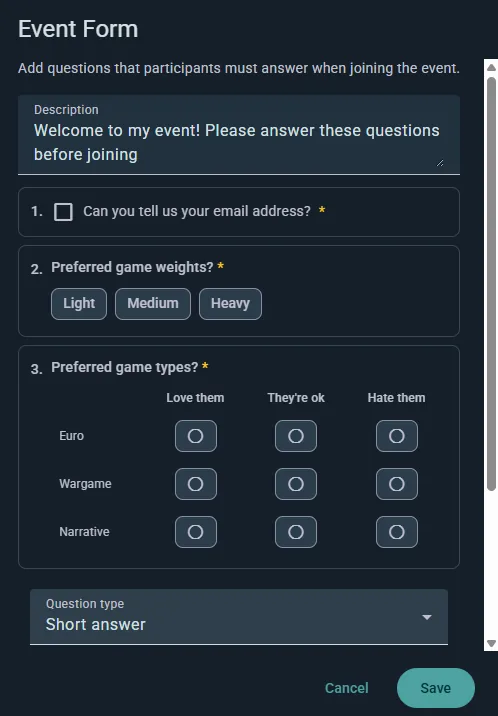
- Etkinliğin ayarlarını açın ve Form bölümünü seçin
- Sorularınızı ekleyin, istediğiniz sıraya sürükleyin (ya da kurduğunuz birini çoğaltın)
- Herhangi bir soruyu Gerekli olarak işaretleyin
- Kaydedin — sorular insanlar kaydolurken görünür
Etkinliğin bir gruba ait olması gerektiğini unutmayın; ayrıca form eklemek anonim konukları kapatır: soru soruyorsanız, Ludoya'nın kimin cevapladığını bilmesi gerekir.
Soru türleri
- Kısa cevap — bir satır serbest metin
- Uzun cevap — daha uzun yazılı bir cevap
- Tek seçim — listeden birini seçin
- Çoktan seçmeli — uyan hepsini seçin
- Lineer ölçek — bir aralıkta puanlayın, iki uçta etiketlerle
- Çoktan seçmeli ızgara — tek bir cevap kümesini paylaşan birkaç soru, satır ve sütunlar hâlinde
- Kişisel bilgiler — E-posta, Telefon numarası, Doğum tarihi ya da Cinsiyet isteyin; serbest metin olarak toplanmak yerine düzgünce doğrulanır
Örnek sorular:
- "Herhangi bir beslenme kısıtlamanız var mı?"
- "Ağır euro oyunlara ne kadar aşinasınız?"
- "Araca ihtiyacınız var mı?"
- "İlk kez mi katılıyorsunuz?"
Konuk başına sor
Kısa cevaplı, seçimli ya da kişisel bilgi soran her soru Konuk başına sor olarak işaretlenebilir. O zaman soru, katılımcının getirdiği her ek kişi için ayrı ayrı cevaplanır — ayrılmış arkadaşlar da adı verilen konuklar da — cevabı katılımcı onlar adına doldurur ve gerekli olanlar tamamlanana dek rezervasyonu bekletir. Dört kişilik masa ayırtan bir kişiden dört ayrı beslenme bilgisini böyle toplarsınız.
Katılımcı deneyimi
İnsanlar kaydolurken cevaplar; gerekli sorular doldurulmadan onay veremezler. Cevaplar kayıtlarıyla birlikte saklanır, katılımcı yönetiminde görünür ve katılımcı listesiyle birlikte dışa aktarılır.
Kullanım örnekleri
- İkramlı etkinlikler — beslenme ihtiyaçları ve alerjiler
- Yeni başlayan geceleri — masaları dengelemek için deneyimi ölçün
- Kurumsal etkinlikler — departman ya da takım bilgisi toplayın
- Temalı geceler — kostüm tercihleri, takım dağılımları
Her etkinliğin hangi formu sorduğunu görmek
Bir etkinliğe kaydolurken neyin sorulduğunu bilmek için ayarlarını açman gerekmez:
- Kulüp konsolunda, herhangi bir etkinlik soru sormaya başlar başlamaz Etkinlikler bölümünde bir Form sütunu çıkar: etkinliğin izlediği şablonun adı ya da Kendi soruları.
- Formlar, her şablon için onu soran etkinlikleri Kullanan altında listeler. Bir şablonun Yanıtlar bölümünü aç; Soran hepsini listeler ve her biri kendi etkinliğini açar.
- Bir etkinliğin konsolunda, genel görünümündeki Form kartı ve programın her bölümündeki kart, kaydolurken neyin sorulduğunu söyler: bir şablonun soruları, kendi soruları, üst etkinliğin soruları ya da hiçbiri; sorular da listelenir. Etkinlik ayarlarındaki aynı seçiciyle orada hemen değiştir; tekrarlanan bir etkinliğin bir tarihinde değişikliğin nereye kadar uzanacağını sorar. Soruları düzenle kendi sorularını değiştirir, Tüm yanıtları gör ise bir şablonun tüm etkinliklerden toplanan yanıtlarını açar.
- Bir festivalin Program bölümünde, kendi formunu soran her aktivite o formun adını gösterir ve Form çipi listeyi aynı formu soran aktivitelere daraltır.
İnsanlar yanıtladıktan sonra bir seçeneği değiştirmek
Aynı düzenleyici bir kulübün katılım formunu ve kaydedilmiş form şablonlarını şekillendirir; kural her yerde aynıdır. Bir seçeneği düzeltmek ya da yeniden ifade etmek için metnini olduğu yerde düzenleyin: onu seçen herkes yanıtını yeni ifadeyle korur, böylece üyeler tablosu, yanıta göre filtresi ve dışa aktarma onları hemen sayar. Yalnızca büyük-küçük harf ya da aksan farkları kendiliğinden eşleştirilir.
Bunun yerine farklı bir şey sunmak için seçeneği silin ve yeni bir tane ekleyin. Silinen seçeneğe verilen yanıtlar olduğu gibi kalır ve asla yeni seçeneğe taşınmaz; böylece kimse seçmediği bir şeyi seçmiş görünmez.
Yanlış yazılmış adresleri ve çift kayıtları düzeltmek
Yanlış yazılmış bir e-posta adresi sessizce başarısız olur: onay e-postası ve kapı QR kodu hiçbir yere ulaşmaz, kişi de çoğu zaman yeniden kaydolur ve sonunda iki yer tutar. Bu, etkinliğinin herhangi bir yerinde olduğunda, etkinlik konsolunun Katılımcılar bölümünde listenin üstünde bir Kontrol edilecekler kartı çıkar ve genel görünümdeki İlgi bekliyor altında bir satır seni ona götürür.
- Yanlış yazılmış görünen adresler, çalışamayacak her adresi (gmail.con, gmai.com, hotmial.com, gmail.es…) kastedilen adresin yanında gösterir. Düzelt, bu öneri doldurulmuş olarak E-postayı düzenle penceresini açar.
- İki kez mi kaydoldu?, aynı listede aynı kişi gibi görünen iki yeri gösterir: Aynı adres (bir yazım hatası ya da Gmail'in noktaları dışında) veya Aynı ad, yani bir adın diğerinin sonuna eklenmiş başka kelimelerle oluşması. Her iki tarafın adresini, onları kimin kaydettiğini, getirdikleri refakatçileri ve ne zaman kaydolduklarını görürsün. Bunu tut, kişi yine de geldiği için kimseye haber vermeden diğer yeri boşaltır ve o yerin getirdiği refakatçiler tuttuğun yere geçer. Bunlar iki farklı kişi bu çifti göstermeyi bırakır.
- E-postayı düzenle, listedeki her satırın menüsünde de bulunur. Bir refakatçinin adresini (formunun onlar için sorduğu) ve entegrasyonunun oluşturduğu, henüz kimsenin etkinleştirmediği bir hesabın adresini düzeltebilirsin. Bir Ludoya kullanıcısının kendi adresi yalnızca ona aittir.
- Onay e-postasını ve QR kodunu bu adrese gönder varsayılan olarak açıktır. Ludoya gönderir; ancak insanları herkese açık API üzerinden kaydedip e-postalarını kendin gönderiyorsan, posta kuyruğunda bekler ve diğer e-postaları gibi onu da kendi adresinden sen gönderirsin.
- Düzeltilen adres bir Ludoya hesabına aitse yer o hesabın olur, kendi uygulamasında görünür. O hesap zaten kayıtlıysa aynı kişi iki kez kayıtlıdır ve kart ikisinden birini tutmayı önerir.
Katılımcı verisi dışa aktarımı (her planda ücretsiz)
Kayıt listelerini ve form yanıtlarını Excel tablosu veya CSV olarak indirin.
Neleri dışa aktarabilirsiniz
Katılımcı başına bir satır, şu sütunlarla:
- name ve username
- nerede — programlı bir etkinlikte: kaydoldukları aktivite, üstündeki bölümlerle birlikte ("Cumartesi: serbest masalar › Azul")
- attendance — katılım durumları
- guests — kaç anonim konuk getirdikleri
- Özel kayıt formlarınızdaki her soru için bir sütun, yanıtlarıyla birlikte
Programlı bir etkinlikte ilk sayfa herkesi listeler; her kişi kaydolduğu her yer için bir kez yer alır. Doğrudan etkinliğin altındaki her aktivite de içindeki herkesle birlikte kendi sayfasını alır.
Bunun üzerine bir hesap tablosu kuracaksanız bilmeye değer iki şey:
- Etkinlikteki herhangi bir formun sorduğu her soru bir sütun alır, yanıtlanmış olsun ya da olmasın; böylece aynı etkinliğin iki dışa aktarımı birbirini tutar. Sonradan kaldırdığınız bir sorunun yanıtları da dışa aktarılmaya devam eder: diğerlerinden sonra gelen,
removed-1,removed-2… adlı sütunlarda. - Çoktan seçmeli yanıtlar tek bir hücrede gelir, bir
|ile ayrılmış olarak; yani "Vejetaryen|Fındık yok" iki sütun değil tek bir alandır.
Giriş kayıtları ve gelmedi işaretleri dışa aktarımda yer almaz — CSV, kimin kaydolduğunu ve size ne söylediğini yansıtır, kapıdan kimin girdiğini değil.
Kullanım örnekleri
- E-posta takipleri ya da sadakat programı izleme
- Kimin neye kaydolduğuna dair kendi analiziniz
- Geçmiş katılım verilerine dayanarak gelecek etkinlikleri planlama
Bir sponsora vermeye hazır, rakamlarla etkinlik için aşağıdaki Etkinlik raporu bölümüne bakın.
Etkinlik raporu (her planda ücretsiz)
Etkinliğiniz başladıktan sonra, konsolundaki Rapor onu içindeki her şeyi sayarak rakamlarla gösterir: her aktivite, stant, turnuva, pazar ve oyun kütüphanesi. Etkinlik sürerken dolmaya devam eder, bittiğinde de kalıcı olarak orada kalır. Onu yalnızca etkinliğin tamamını yürüten kişi, etkinliğin kendi konsolundan görür; tek bir standı yürüten bir kulüp ise onun yerine o standın konsolunu görür.
En üstte
Kaydolan kişiler (etkinliğe ya da içindeki herhangi bir şeye kaydolan herkes, her biri bir kez sayılır, refakatçiler dahil: Genel görünüm ekranındaki Kimler geliyor sayısı), yapılan aktiviteler, dolan yerler (sunulan yerlerden kaçının alındığı) ve satılan ikinci el oyunlar. Her aktivite en fazla kendi yer sayısı kadar sayılır, yani dolu bir masaya sıkışan kişiler başka yerdeki boş bir masayı telafi etmez; bu kişiler ayrıca, zaten dolu aktivitelere eklenen kişiler olarak gösterilir.
Neler işe yaradı ve bir dahaki sefere nelere bakmalı
İki kısa liste neyi tekrarlayıp neyi değiştireceğinizi, her birinin arkasındaki sayıyla birlikte gösterir: tüm yerleri dolan ya da bekleme listesi olan aktiviteler (bunlardan daha fazlasını sunun), en yoğun saat, önceki etkinliklerinize de gelmiş kişiler, ikinci bir kopyası gerekecek kadar sık ödünç verilen bir oyun, kimsenin kaydolmadığı ya da neredeyse boş kalan aktiviteler, girişte beklenip gelmeyen kişiler. Bir satır, ancak sayılar bir anlam taşıyacak kadar büyük olduğunda görünür.
Grafikler ve rakamlar
- En popüler ve en az dolan aktiviteler ile programın bölüme göre dolan yerleri (tüm rol yapma oyunları, tüm turnuvalar)
- Başlangıç saatine göre dolan yerler: bir oyun standının oturumları kendi saatlerinde sayılır
- En çok oynanan oyunlar ve kütüphaneden en çok ödünç verilen oyunlar
- Stant geri bildirimleri: her oyun standının oturum sonrası kendi sorularına ilişkin sonuçları: oyuncularından kaçının yanıtladığı, her ölçeğin ortalaması ve çoktan seçmeli bir sorunun her yanıtını seçen oyuncuların oranı. Oyuncuların birden fazla seçebildiği bir soruda oranların toplamı %100'ü aşar; uzun bir liste en çok seçilen üç yanıtı gösterir. Yorumlarını okumak için bir standı adından açın
- Rakamlarla: kişiler (refakatçiler, doğrudan etkinliğe kaydolanlar, önceki etkinliklerinize de gelenler, yeni Ludoya hesapları, giriş kayıtları, bekleme listeleri), program (dolan aktiviteler, standların geri bildirim sorularına verilen yanıtlar), ikinci el pazarı (pazar standında ve etkinlik için açılan çevrimiçi ilanlarla satılanlar ve satış tutarları), oyun kütüphanesi, etkinliğin sohbetlerindeki mesajlar ve gönderdiğiniz duyurular, etkinlikte varsa quiz rotası ve biletler
Tüm aktiviteler
Her aktivite bölümü, başlangıç saati, dolan yerleri ve doluluğuyla; sıralanabilir ve hesap tablosu olarak indirilebilir. Kimsenin rezervasyon yapmadığı bir aktivite (bir demo masası, serbest oyun) sıfır yerine Açık, kayıt yok gösterir. Bir oyun standı, oturumları toplanarak tek bir aktivite sayılır; bir turnuva, turları içinde olmak üzere bir kez sayılır.
Diğer etkinliklerinizle karşılaştırma
Rapor, etkinliği kulübünüzün insanların geldiği önceki etkinliklerinin yanına koyar, en yeniden başlayarak: kaydolan kişiler, aktiviteler, dolan yerler, doluluk, oyun oturumları ve satılan oyunlar. Bir festival, kendi programı olan diğer etkinliklerinizle karşılaştırılır, asla haftalık bir oyun gecesiyle değil; ve yalnızca sizin de yürüttüğünüz etkinliklerle.
PDF olarak indirin
PDF indir, raporun tamamını bir sponsora, belediyeye ya da kendi ekibinize göndermek için kaydeder. Yalnızca toplamlar: gelenlerden hiç kimsenin adı geçmez. Oyuncuların bıraktığı yorumlar her standın Geri bildirim kartında kalır.
Bir kulübün etkinliği 10 ya da daha fazla kişiyle sona erdiğinde, kulübün yöneticileri raporda Başka bir kulüp getir kartını da bulur: etkinliğin kaç kişiyi bir araya getirdiği ve kulübün davet bağlantısı için Paylaş (bkz. kulüp konsolu).
Uygunluk Isı Haritası (Club Katmanı)
Katılımcıların etkinlik boyunca gerçekten ne zaman orada olacağını gösteren, etkinliğe özel bir ısı haritası; böylece organizatörler planlanmış oyun oturumlarını en çok insanın bulunduğu saatlere göre kurgulayabilir.
Katılımcılar nasıl katkıda bulunur
Bir etkinliğe katılırken her katılımcı, etkinliğin kendi programındaki hangi zaman dilimlerinde orada olacağını işaretler. Cuma akşamından pazara süren bir hafta sonu buluşmasında biri "Cuma 18:00–22:00 ve Cumartesi bütün gün" diyebilir, bir başkası ancak cumartesi öğleden sonra gelebilir. Katılım düğmesinin menüsü bu kişisel katılım programını istedikleri an düzenlemelerine izin verir.
Ne gösterir
- Etkinliğin kendi programı boyunca serilmiş görsel bir yoğunluk şeridi (haftalar ya da aylar değil)
- En çok katılımcının bulunacağı tepeler
- Az katılımcının yetişebildiği çukurlar
- Katılımcılar uygunluklarını değiştirdikçe canlı güncellenir
Organizatörler nasıl kullanır
- Etkinliğin katılımcı listesini açın
- Programları görüntüle’ye dokunun
- En çok insanın bulunacağı dilimler için Kullanılabilirlik Genel Bakışı yoğunluk şeridini okuyun
- En önemli planlanmış oyunlarınızı, konuşmalarınızı ya da turnuvalarınızı o tepelere koyun ki en büyük kitle katılabilsin
- Altında Bireysel Programlar, her katılımcıyı adıyla ve kendi dilim dilim çubuklarıyla sıralar — ağır bir oyun için bir tanıtıcıyı ya da önceden ayarlanmış bir masanın oyuncularını denk getirmeniz gerektiğinde işe yarar
Kim neyi görür
İki bölüm de aynı pencerede birlikte görünür: toplu şerit ve adlı bireysel programlar. Ev sahibi grubu Club planında olan bir etkinlikte, katılımcı listesini açabilen herkes bunları görebilir — yalnızca organizatörler değil.
Bunu katılımcılarınıza söyleyin, çünkü işaretledikleri saatler etkinliğin geri kalanına adlarıyla görünür. Belirli bir etkinlikte istediğiniz bu değilse, insanlardan kişisel bir program doldurmalarını istemeyin.
Etkinlikteki herkese duyurular (tüm planlarda ücretsiz)
Etkinliğindeki herkese bir şeyi tek seferde söyle: turnuva geç başlıyor, bir etkinlik başka bir salona taşınıyor, işte günün planı. Etkinliğin konsolunu aç ve Duyurular'ı seç.
Kimler alır
Etkinliğe katılan herkes: yalnızca etkinliğin kendisine kaydolanlar değil, şunları yapan herkes:
- içindeki herhangi bir etkinliğe, oyuna veya turnuvaya kaydolanlar
- ikinci el pazarında satış yapanlar ya da orada ayırtılmış bir kutusu olanlar
- oyun kütüphanesinden oyun ödünç alanlar
Duyuruyu yalnızca bir bölüme de gönderebilirsin: tek bir aktiviteye (yalnızca hazine avındakilere) ya da içindeki tüm aktivitelerle birlikte programın bütün bir bölümüne (tüm FRP masalarına aynı anda). Aktivitenin bekleme listesi varsa bekleme listesini de ekle. Göndermeden önce sayfa, duyurunun kaç kişiye ve nasıl ulaşacağını gösterir: uygulamayla ya da uygulaması olmayanlara e-postayla. Birinin kendisiyle birlikte kaydettiği refakatçiler duyuruyu o kişi aracılığıyla alır.
Nasıl ulaşır
- Uygulamada bildirim olarak, uygulaması olmayanlara da e-postayla: her şeyde olduğu gibi her kişinin kendi bildirim ayarları belirler
- Kulübünden (ya da kişisel bir etkinlikte senden) gelir, etkinliğin adını taşır
- İnsanların tam olarak ne alacağını görmek için önce Bana test gönder'i kullan
Etkinliğin duyuru panosu
Gönderdiğin her mesaj etkinliğin sayfasında da en yenisi başta olacak şekilde kalır; böylece sayfayı sonradan açan ya da o gün gelen herkes neyin duyurulduğunu okur. Bir aktivitenin sayfasında tüm festivale ve onun bölümüne giden mesajlar da görünür. Bir mesaj güncelliğini yitirdiğinde, onu Gönderdikleriniz bölümünden etkinlik sayfasından kaldırın: zaten almış olanlar saklar.
Sınırlar
Etkinlik başına günde en fazla 5 mesaj (tek bir aktiviteye ya da bölüme gidenler dahil), böylece gönderdikleriniz okunur.
Playtest dağıtımı (Business planı)
Tasarımcıların prototip getirdiği ve oyuncuların bunları test ettiği bir gün için. Elle planlanan bir rotasyon yerine Ludoya herkesi masalara, zaman dilimi zaman dilimi oturtur.
Açmak
Bir etkinliğin formunda (turnuva ya da oyun masası değil, sıradan bir etkinlik) + Masa eşleştirme'ye dokunun ve Ludoya oyun test edenleri yerleştirir seçeneğini seçin. Zaman dilimleri, masalar ve program sonra etkinliğin konsolunda, Playtesting altında ayarlanır: bir dilimin ne kadar sürdüğü, salonda kaç masa olduğu ve her oyunun masasının ne kadar sürdüğü (oyunun oynanış süresinden yola çıkar).
Günden önce
- Tasarımcılar prototiplerini etkinliğin sayfasından Bir prototip getir ile ekler.
- Oyuncular denemek istedikleri prototipleri etkinliğin sayfasında işaretler. Konsol en çok istenenleri gösterir.
Program
Prototipler geldiğinde Programı oluştur'u seçin. Ludoya herkesi dilimlere dağıtır, her masayı etkinliğin programına sıradan bir oyun masası olarak ekler ("Masa 3 · oyun") ve her kişiye masalarını içeren tek bir bildirim gönderir. Ardından konsol kaç dileğin karşılandığını ve hangi kişi çiftlerinin iki kez karşılaştığını gösterir: bir masa ya da dilim daha, karıştırmak için yer açar.
İnsanlar katılır ya da ayrılırsa veya yeni prototipler gelirse, Programı güncelle hâlihazırda oynanan masaları ve sabitlediğiniz yerleri korur, geri kalan herkesi yeniden oturtur. Yeniden oluştur başlamamış her masayı yeniden karıştırır. İki durumda da yalnızca masası değişen kişiler haberdar edilir.
Playtest dağıtımını kapatmak, onun planladığı ve başlamamış masaları kaldırır. Oynanmış masalar kalır.
Prototiplerim (oyun tasarımcıları için)
Henüz yayımlanmamış bir oyun da bir yuva bulur. Keşfet → Oyunlar içinde, Oyununu bulamıyor musun? altında Bu benim prototipim seçeneğini seçin; o andan itibaren Prototiplerim ana sayfanızda bir karttır.
- Yeni prototip: her oyunda olduğu gibi bir ad, açıklama, oyuncu sayısı, oyun süresi ve asgari yaş. Üzerinde çalışırken Özel, bağlantıyla paylaşmak için Listelenmemiş ya da Herkese açık tutun. Özel bir prototip playteste getirilemez: önce listelenmemiş veya herkese açık yapın.
- Sürümler: oyun her değiştiğinde bir tane ekleyin (Yeni sürümün adı); böylece geri bildirim, insanların gerçekten oynadığı sürüme bağlanır.
- Sahipler: tasarım ekibinin geri kalanı için Ortak sahip ekle; her sahip prototipi yönetir.
- Geri bildirim formu: test edenlerin bir sürümü oynadıktan sonra yanıtladığı sorular. Bir playtest masasından sonra oyuncular orada Geri bildirim ver seçeneğini görür.
- Geri bildirim: her sürümün puanları ve yorumları, her sorunun Sürümler arasında nasıl değiştiği; böylece bir değişikliğin işe yarayıp yaramadığını görürsünüz.
- Playtestler: prototipin götürüldüğü her etkinlik. Playtest eşleştirmesi olan bir etkinlikte Bir prototip getir onu oraya kaydeder.
Etkinlik büyük ekranda (Business planı)
Etkinliği mekanın projektöründe veya televizyonunda gösterin. Etkinliğin menüsünden ya da konsolundan Ekranda göster seçeneğini, ardından Ekranı aç seçeneğini seçin:
- Bir turnuva, turun masalarını, tur saatini ve sonuçlar geldikçe güncellenen puan durumunu gösterir. Sıralamayı yalnızca sonda göster açıkken ekran da onu gizli tutar.
- Bir program veya oyun standı, şimdi ve sırada ne olduğunu, nerede olduğunu ve kalan yerleri gösterir.
- Köşedeki bir QR kodu, izleyicilerin telefonlarından takip etmesini ve kaydolmasını sağlar.
Bir festivalin bir bölümü ya da turnuvası, kendi konsolundan kendi ekranına sahip olabilir: FRP salonu yalnızca kendi masalarını, turnuva salonu yalnızca kendi turlarını gösterir. Festivalin planıyla çalışır.
Ekranda kimsenin oturum açmış olması gerekmez: anahtar bağlantıdır, bu yüzden projektörün altındaki bilgisayar herhangi birine ait olabilir. Projektör başka bir bilgisayarda mı? Aynı bağlantıyı orada açın ve tam ekran için F tuşuna basın. Ekran etkinliği birkaç saniyede bir yeniden yükler ve bağlantıyı kaybederse köşede bunu söyler; böylece eski bir ekran asla canlıymış gibi davranmaz. Bağlantı olmaması gereken bir yere ulaşırsa Yeni bir bağlantı oluştur seçeneğini kullanın; eskisi çalışmayı bırakır.
Festivalin Her Yerinde Bir Quiz Rotası (Business Planı)
Quiz rotası ziyaretçileri standlar arasında dolaştırır: katılan her standın kendi QR kodu ve kısa bir sorusu olan bir afişi vardır. Rotayı etkinlik konsolunda, Quiz rotası bölümünde kurarsın.
- Quiz rotası kur, sonra her stand için Durak ekle: nerede olduğunu ve oyuncuların orada ne yapacağını belirle: Cevap seç (doğru olanı işaretle ya da anket seç), Cevap yaz (doğru kabul ettiğin tüm cevapları listele; büyük/küçük harf, aksanlar ve noktalama sayılmaz) ya da Sadece bul.
- Ayarlar bölümünde Ödül ve çekiliş satırını yaz (ne kazanılabileceği, çekilişin ne zaman ve nerede yapılacağı): her durakta ve afişte görünür.
- Afişleri yazdır: her durak için bir afiş, QR koduyla ve kamera okuyamadığında yazılacak kısa bir adresle. Boyutu seç: duvar ya da stand önü için A4, stand masası için A5 (bir A4 sayfaya iki tane) ya da tezgâh kartı için A6 (bir sayfaya dört tane). Bir afiş ıslandı mı? Durağın menüsündeki Bu durağın afişini yazdır yalnızca onu yeniden basar. Duraklar istenen sırayla bulunur, bu yüzden afişlerde numara yoktur. Taslak aşamasındayken durakları yalnızca düzenleyiciler açabilir, bu yüzden önce onları dene.
- Kapılar açılınca Quiz rotasını aç. Etkinliğin önce bir tarihi olmalı.
Gerçek haritası olan bir mekânda (bir kasaba, bir meydan) her durak için bir Mekân haritasındaki yer alanı vardır. Yeni bir durak Durağın adını taşıyan yer ile başlar: mekânın o adı taşıyan yeri ya da harita düzenleyicisinde işaretlenmeyi bekleyen yeni bir yer. Altmış vitrin mi? Durakları ekle, sonra yerlerini tek seferde işaretle. Her durağa bir yer ver bunu daha önce eklenen duraklar için yapar; konsol kaç durağın hâlâ haritada olmadığını söyler ve harita düzenleyicisini açmak için Onları işaretle düğmesini sunar. Oyuncular Durakları haritada gör'ü herhangi bir durağın sayfasından açar: Quiz rotası katmanı her durağı bulunacak bir bayrak ya da bulunduktan sonra yeşil bir onay işareti olarak gösterir ve toplam kaç duraktan kaçını bulduklarını söyler; Onları gör haritanın henüz gösteremediği durakları listeler (önce bulunacak olanlar) ve bir yere dokunmak oradaki durakların adlarını verir, ne sorduklarını asla. Durak listesini gizlediğin sürece harita da onları gizler.
Ziyaretçiler telefonlarının tarayıcısında, uygulama kurmadan oynar. Taradıkları ilk durak sorusunu gösterir ve bir ad (ya da takım adı: tek telefondaki bir aile tek takım olarak oynar), bir e-posta ve 14 yaşında ya da daha büyük olduklarını veya çocuklarıyla oynadıklarını onaylamalarını ister. Zaten Ludoya hesabı olan bir e-postaya bunun yerine e-postayla bir kod gönderilir, böylece kimse başkasının yerine oynayamaz. Diğer tüm duraklar doğrudan sorusuna geçer. Her durak tek bir cevap alır ve oyuncuların doğru bilip bilmediklerini her cevaptan hemen sonra mı yoksa yalnızca quiz rotası bitince mi göreceklerini sen seçersin (ikincisi cevapların dolaşmasını engeller). Günün ortasında yanlış yazılmış bir doğru cevabı mı düzelttin? O duraktaki herkesin cevapları yeniden değerlendirilir. Festivalin ortasında ayrılan bir stand mı var? Bu durağı kapat: QR kodu artık cevap almaz, onu bulanlar puanını korur ve diğer herkes için rotadan ve afişlerden çıkar.
Konsol her durakta kaç kişinin cevap verdiğini ve Sıralama bölümünü gösterir: önce en çok doğru cevap, sonra en çok durak, sonra ilk bitiren. Gönüllüler bir oyuncuyu adıyla bulabilir ve sıralama tablo olarak indirilebilir. Ödül vermek için etkinliğe bir çekiliş ekle ve Kim katılır bölümünde, bulunan durak ya da doğru cevap için bir alt sınırla Quiz rotası oyuncuları seçeneğini seç; diğerlerini dışarıda bırakmadan en iyileri ödüllendirmek için Her doğru cevap bir bilet daha demek kutusunu işaretle. Ardından her durak oyunculara çekilişe girmek için ne gerektiğini ve ne zaman girdiklerini söyler. Oynayan düzenleyiciler ve gönüllüler de çekilişe katılır: içlerinden biri kazanırsa kazancı iptal et ve yeniden çek. Çekilişi yaparken Quiz rotasını bitir: artık cevap alınmaz ve oyuncular sonuçlarını görür.
Ludoya hesabını hiç tamamlamayan ziyaretçilerin bilgileri etkinlikten 30 gün sonra silinir.